As I may have mentioned, I recently reinstalled Ubuntu (had been using Windows 7 for a few months). Since the reinstall I had changed my common login password for the other computers on the network so of course I updated my user password for the new install.
The slight problem came when I used any application that accessed the keyring (say, network-manager), as there was a password mismatch between my credentials and the keyring. This was because I preserve my /home partition to keep my data (a good practice) and that is where the keyring data gets stored (logically). But it got tiresome to frequently see:
“Enter password to unlock your login keyring. The password you use to login to your computer no longer matches that of your login keyring”
It’s dead easy to fix though.
- Go to
Applications -> Accessories -> Passwords and Encryption Keys - Right-click on Passwords: login
- Select “Change Password”
- Enter your old login password (the one that it repeatedly asks for!) in the old password bit, and put your current login password in the new password fields.
And that’s all there is to it!
2022 Update
As Richard Hartley points out in the comments, the steps above aren’t where things are found nowadays, twelve years later. Instead, you can access ‘Passwords and Logins’ from the launcher:
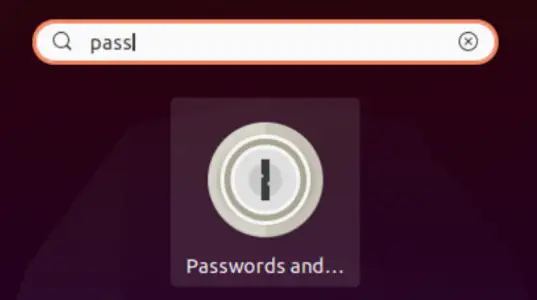
and you get to the Passwords and Logins settings:
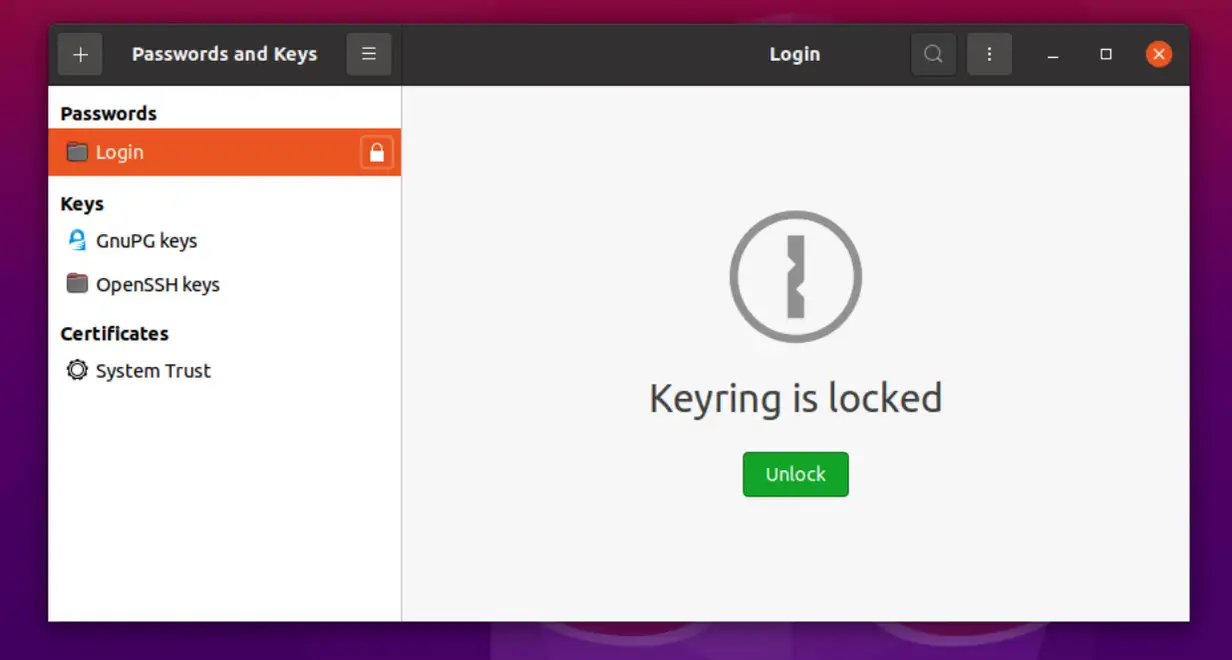
An alternate “fix” is to remove the file at “~/.gnome2/keyrings/default.keyring”, which is what I did as I don’t know what password it’s looking for. Just a thought…
—
Brie
thx, worked perfectly 🙂
Good shout Brie, that also works. In my case I knew it was my old password, but that method is probably useful in more cases!
jay, glad it helped!
Hi Brie,
I am new to Linux Mint 10. I have this keyring problem as well, but I looked and looked…I cannot find the default.keyring file. I thought I was using gnome2, but I only see gnome directories. Do you have any idea which file I should be looking for to delete?
Thanks – Alan
Alan, I’m not familiar with Linux Mint, but the file browser may be hiding directories beginning with a period by default. If you open up a terminal (command line) and type
rm ~/.gnome2/keyrings/default.keyringDoes that work?
Hi Robert,
Thanks, I fished around for the file through all the trees and found it. I took out the entry and it is fine now. I appreciate the help!
Alan
Thanks Brie!
I had changed my login password and forgotten the old one. That tip worked for me.
Yay!
Thanks Brie. That was the fix I was looking for. You are awesome!
Thanks Brie, that did it for me as well 🙂
This is a test of 404s
Alan,
I am running Linux Mint 14 and cannot find the file. I don’t remember my old password so it’s a bit of a problem. How can I change my Login Keyring password to my new user psswd without having to know my old password?
For me on Debian 9/Stretch using the Mate desktop (as of July, 2017), I found my keyring in the ~/.local/share/keyrings/ directory, not under ~/.gnome2. In that directory were login.keyring and user.keystore files. I just rm -rf’d the whole directory, but then next time I used the network manager it still popped up a dialog box — this time with a different message, and asking me NEW password. Briefly annoying until I figured out that removing the gnome-keyring package had not killed the still-running /usr/bin/gnome-keyring-daemon so I killed it and voila.
They should change the error message to tell you it is your old password. The message is ambigious.
Agreed, it’s caused quite a bit of confusion!
Thanks! Worked like a charm 🙂
Glad to hear this is still helping folks 11 years on, thanks for saying so Julian 🙂
Edit: … seems using a unicode emoji results in it being rendered as a ?, which somewhat changes the meaning (:
In Ubuntu there is no accessories in Applications. There is a settings option, but no accessories. I am none the wiser and still get this annoying Lord of the Keyring nuisance. Who programmed this to annoy with non-programmers?
“It’s easy, just put in the password that no longer exists, because you cannot remember it, which is why you changed it as root” lol.
Hehe, fair point. However, I did remember the previous password, and I still do ten years on. Hurray for muscle memory.
(the password was of course ‘hunter2’
More seriously, if you have trouble remember passwords it is worth investing in a good password manager. I run a self-hosted BitWarden via Docker.
Thank you so much!!!
You are most welcome 🙂
On Linux Mint Cinnamon 20.3 I found the file in the user’s home under .local/share/key rings/user.keystore, thanks for the pointer in the right direction to find what I needed and thanks to my buddy Steve Davidson who taught me enough about this that I was able to figure it out once I had a clue from your message here
Hi Matthew, thanks for stopping by and leaving a comment- glad you got it sorted and to be of help 🙂
In my case it doesn’t work. When I click “change password” it requires the old password, and that’s the bit I struggle with, as I don’t know it.
@cloberian: Yeah, it’s a pain if you don’t remember the old apssword- this was written when i had changed the password but remembered the old one. One of the things I recommend now — alongside making sure you have multiple backups — is to use a password manager; password reuse is too risky, and there are too many services nowadays to remember them all. Good luck!
what is Applications -> Accessories? I do not know where to find Applications
Hi Richard, this post is quite old and things get moved around. It depends what desktop environment you’re using, but if using the default, you can get it from the launcher (accessed using the meta / windows key):
and it should look something like this:
Good luck!
Pingback: Using Zoho for WordPress emails? Use an App Specific Password – Rob's Blog